> ## Documentation Index
> Fetch the complete documentation index at: https://docs.vigolium.com/llms.txt
> Use this file to discover all available pages before exploring further.
# Using Vigolium with Burp Suite
> Install the Vigolium Burp Suite extension, forward proxy traffic into a running Vigolium server, launch native and agentic scans from Burp, and use the bidirectional live bridge to sync traffic in both directions.
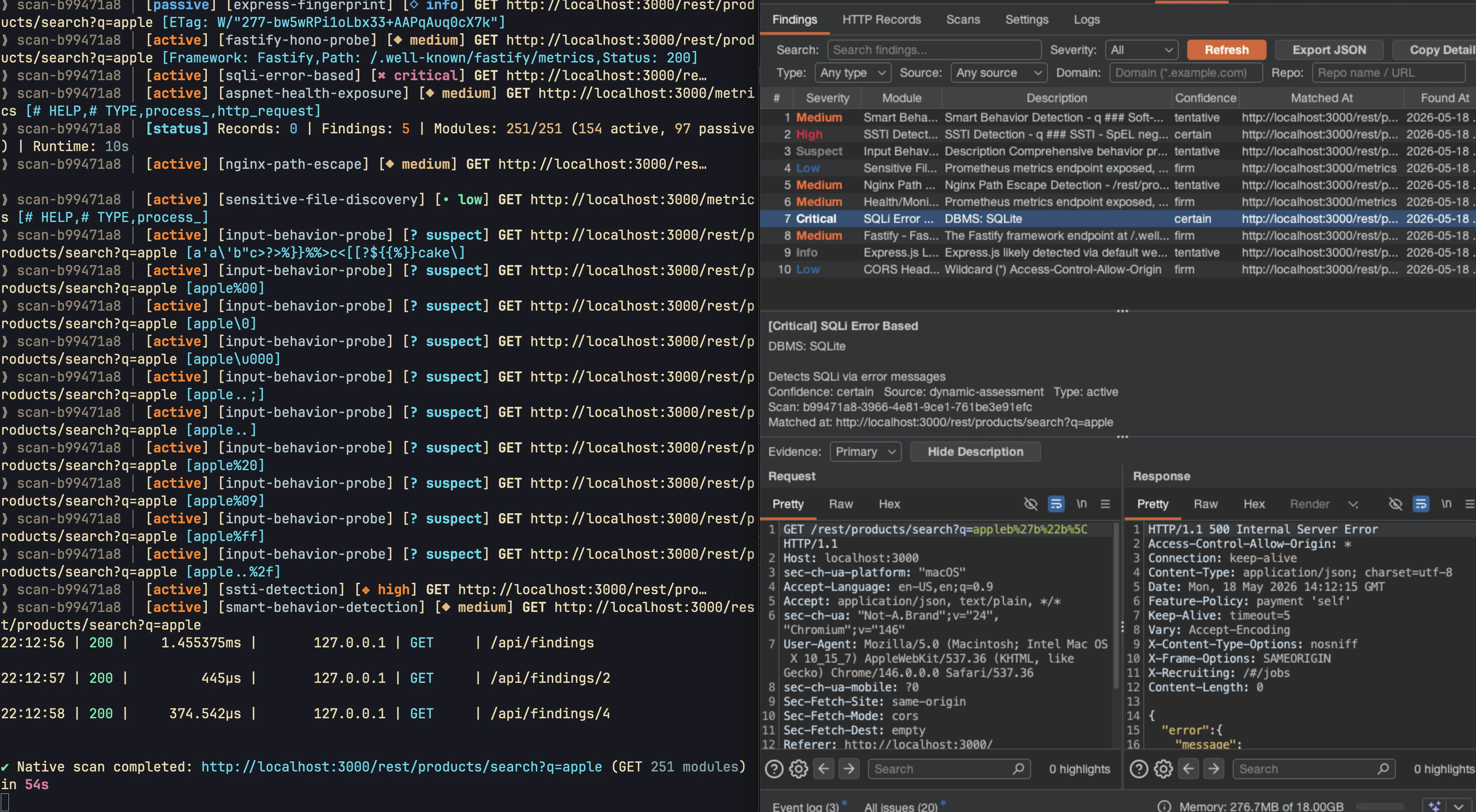
The **Vigolium Burp Suite extension** turns Burp into a front-end for your Vigolium server. As you browse, requests and responses are forwarded to Vigolium, native and agentic scans are launched straight from Burp's context menus, and findings stream back into both Burp and the [Web UI](/getting-started/web-ui) because everything is stored in the same Vigolium database.
The extension does **not** run the scanner inside Burp's JVM. It forwards traffic to the Vigolium server and polls it for findings, so scans use your Vigolium server resources and keep running even after Burp is closed.
 ## Download the extension
The extension is distributed as a pre-built JAR from the dedicated repository:
Grab the latest **`burp-vigolium.jar`** and browse the source at
[github.com/vigolium/burp-vigolium](https://github.com/vigolium/burp-vigolium).
Download [`burp-vigolium.jar`](https://github.com/vigolium/burp-vigolium/blob/main/burp-vigolium.jar) directly, or build it from source:
```bash theme={null}
git clone https://github.com/vigolium/burp-vigolium
cd burp-vigolium
./gradlew spotlessCheck test shadowJar # → build/libs/burp-vigolium.jar
```
## Install and connect
The extension needs a running server to talk to. Start one (add `--mirror-fs ` to also write traffic to disk):
```bash theme={null}
# With API authentication (recommended)
export VIGOLIUM_API_KEY=my-secret-key
vigolium server
# Or, local development only — no auth
vigolium server -A
```
Retrieve the API key to paste into the extension:
```bash theme={null}
vigolium config ls server.auth_api_key --force
```
In Burp, go to **Extensions → Installed → Add**. Set **Extension type: Java**, choose the downloaded `burp-vigolium.jar`, and click **Next**. A **Vigolium** tab appears.
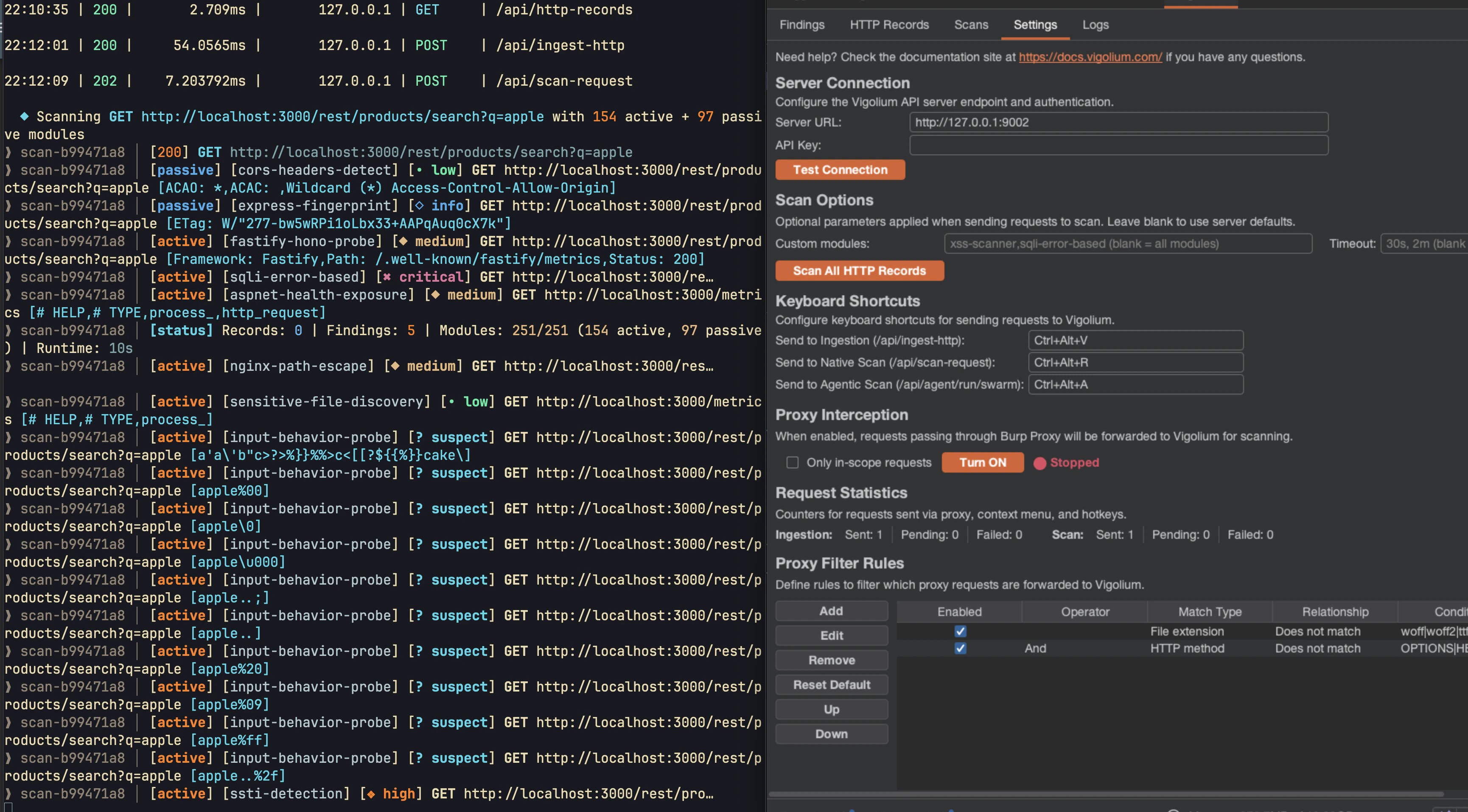
Open **Vigolium → Settings**, enter the **Server URL** (default `http://127.0.0.1:9002`) and **API Key** on the Server Connection row, then click **Test Connection** to confirm the server is reachable.
Use a Burp context-menu action or a keyboard shortcut to dispatch traffic. Findings stream into the **Findings Records** tab and the Web UI as they are produced.
The installed extension version is shown in the upper-right corner of the **Settings** view. Release builds read it from the JAR manifest; local IDE runs display `development`.
## Three dispatch workflows
Right-click a request in **Proxy History**, **Target Site map**, **Repeater**, or any supported Burp request view — the actions are available directly, without opening a nested menu:
| Action | Default shortcut | What it does |
| -------------------------------- | ---------------- | ----------------------------------------------------------------------- |
| **Send to Vigolium** (ingestion) | `Ctrl+Alt+V` | Stores the selected request/response in Vigolium via `/api/ingest-http` |
| **Send to Native Scan** | `Ctrl+Alt+N` | Starts a deterministic module-based scan of the selected request |
| **Send to Agentic Scan** | `Ctrl+Alt+A` | Starts an AI-guided (swarm) scan of the selected request |
Vigolium preserves headers, cookies, body fields, query parameters, and path segments as scanner input, so a request sent from Repeater is scanned exactly as you shaped it.
## Forward proxy traffic automatically
Instead of dispatching requests one at a time, enable **Proxy Mode** to forward everything flowing through Burp Proxy into Vigolium. Combine it with **In-scope only** so static assets and out-of-scope hosts don't pollute the database, and use the **Proxy Filter Rules** to allow or deny by file extension, HTTP method, or host.
Pair Proxy Mode with a passive-only server (`vigolium server -S --passive-only`) to continuously analyze browsed traffic — secrets, security headers, cookie flags, disclosure — without sending any active requests. See [Server & Ingestion](/getting-started/server-and-ingestion).
## What you get inside Burp
The **Vigolium** panel is organized into six tabs:
| Tab | Purpose |
| -------------------- | --------------------------------------------------------------------------------------------------------------------------------------------------- |
| **Findings Records** | Searchable, sortable findings with per-finding evidence tabs, request/response editors, an expandable description, and **Copy Finding as Markdown** |
| **HTTP Records** | Filterable, sortable request/response records synchronized with Vigolium |
| **Scanning Records** | Native and agentic scan history with pagination, auto-refresh, and scan logs |
| **Bridge** | Target Site map snapshots, the live loopback listener, Proxy forwarding, and filter rules |
| **Settings** | Extension version, server connection, scan options, request statistics, and configurable hotkeys |
| **Logs** | Timestamped activity log (INFO / WARN / ERROR) |
Selecting a finding opens its primary request and response in Burp's message editors; additional evidence appears as adjacent tabs so you can compare without a drop-down. The orange **Copy Finding as Markdown** action copies the full finding — metadata, description, matched URLs, requests, responses, and extra evidence — ready to paste into a report or a coding agent.
## Download the extension
The extension is distributed as a pre-built JAR from the dedicated repository:
Grab the latest **`burp-vigolium.jar`** and browse the source at
[github.com/vigolium/burp-vigolium](https://github.com/vigolium/burp-vigolium).
Download [`burp-vigolium.jar`](https://github.com/vigolium/burp-vigolium/blob/main/burp-vigolium.jar) directly, or build it from source:
```bash theme={null}
git clone https://github.com/vigolium/burp-vigolium
cd burp-vigolium
./gradlew spotlessCheck test shadowJar # → build/libs/burp-vigolium.jar
```
## Install and connect
The extension needs a running server to talk to. Start one (add `--mirror-fs ` to also write traffic to disk):
```bash theme={null}
# With API authentication (recommended)
export VIGOLIUM_API_KEY=my-secret-key
vigolium server
# Or, local development only — no auth
vigolium server -A
```
Retrieve the API key to paste into the extension:
```bash theme={null}
vigolium config ls server.auth_api_key --force
```
In Burp, go to **Extensions → Installed → Add**. Set **Extension type: Java**, choose the downloaded `burp-vigolium.jar`, and click **Next**. A **Vigolium** tab appears.
Open **Vigolium → Settings**, enter the **Server URL** (default `http://127.0.0.1:9002`) and **API Key** on the Server Connection row, then click **Test Connection** to confirm the server is reachable.
Use a Burp context-menu action or a keyboard shortcut to dispatch traffic. Findings stream into the **Findings Records** tab and the Web UI as they are produced.
The installed extension version is shown in the upper-right corner of the **Settings** view. Release builds read it from the JAR manifest; local IDE runs display `development`.
## Three dispatch workflows
Right-click a request in **Proxy History**, **Target Site map**, **Repeater**, or any supported Burp request view — the actions are available directly, without opening a nested menu:
| Action | Default shortcut | What it does |
| -------------------------------- | ---------------- | ----------------------------------------------------------------------- |
| **Send to Vigolium** (ingestion) | `Ctrl+Alt+V` | Stores the selected request/response in Vigolium via `/api/ingest-http` |
| **Send to Native Scan** | `Ctrl+Alt+N` | Starts a deterministic module-based scan of the selected request |
| **Send to Agentic Scan** | `Ctrl+Alt+A` | Starts an AI-guided (swarm) scan of the selected request |
Vigolium preserves headers, cookies, body fields, query parameters, and path segments as scanner input, so a request sent from Repeater is scanned exactly as you shaped it.
## Forward proxy traffic automatically
Instead of dispatching requests one at a time, enable **Proxy Mode** to forward everything flowing through Burp Proxy into Vigolium. Combine it with **In-scope only** so static assets and out-of-scope hosts don't pollute the database, and use the **Proxy Filter Rules** to allow or deny by file extension, HTTP method, or host.
Pair Proxy Mode with a passive-only server (`vigolium server -S --passive-only`) to continuously analyze browsed traffic — secrets, security headers, cookie flags, disclosure — without sending any active requests. See [Server & Ingestion](/getting-started/server-and-ingestion).
## What you get inside Burp
The **Vigolium** panel is organized into six tabs:
| Tab | Purpose |
| -------------------- | --------------------------------------------------------------------------------------------------------------------------------------------------- |
| **Findings Records** | Searchable, sortable findings with per-finding evidence tabs, request/response editors, an expandable description, and **Copy Finding as Markdown** |
| **HTTP Records** | Filterable, sortable request/response records synchronized with Vigolium |
| **Scanning Records** | Native and agentic scan history with pagination, auto-refresh, and scan logs |
| **Bridge** | Target Site map snapshots, the live loopback listener, Proxy forwarding, and filter rules |
| **Settings** | Extension version, server connection, scan options, request statistics, and configurable hotkeys |
| **Logs** | Timestamped activity log (INFO / WARN / ERROR) |
Selecting a finding opens its primary request and response in Burp's message editors; additional evidence appears as adjacent tabs so you can compare without a drop-down. The orange **Copy Finding as Markdown** action copies the full finding — metadata, description, matched URLs, requests, responses, and extra evidence — ready to paste into a report or a coding agent.
 ### Keyboard shortcuts
Every action is rebindable under **Settings → Keyboard Shortcuts**. The defaults:
| Action | Default shortcut |
| -------------------------- | ---------------- |
| Send to ingestion | `Ctrl+Alt+V` |
| Send to native scan | `Ctrl+Alt+N` |
| Send to agentic scan | `Ctrl+Alt+A` |
| Snapshot Target Site map | `Ctrl+Alt+S` |
| Refresh active record view | `Ctrl+Alt+R` |
`Ctrl+Alt+R` is contextual — while focus is inside Findings Records, HTTP Records, Native Scans, or Agentic Scans, it activates that view's Refresh button.
## Target Site map snapshots
Beyond per-request dispatch, the extension can upload your whole **Target Site map** to Vigolium in one shot. Open **Vigolium → Bridge → Target Site Map Snapshot** and either run a snapshot immediately (`Ctrl+Alt+S`) or enable periodic snapshots (disabled by default; five-minute interval when on). Use **In-scope only** to exclude out-of-scope traffic.
Snapshots are **incremental** within the current Burp session and **idempotent** on the server: requests and available responses upload in bounded chunks, and unchanged records are never duplicated.
## Bidirectional live bridge
The **live bridge** connects Vigolium's CLI and server to Burp in *both* directions over an opt-in, loopback-only listener — query live Burp Proxy history from Vigolium, or copy Vigolium traffic back into Burp's Target Site map.
Open **Vigolium → Bridge**, select **Enable live bridge**, and set the listener URL (default `http://127.0.0.1:9009`). The extension starts an embedded HTTP server on that loopback address; it refuses non-loopback binds. Optionally enable **In-scope items only** to keep bridge searches within Burp's Target scope.
```bash theme={null}
export VIGOLIUM_BURP_BRIDGE_URL="http://127.0.0.1:9009"
```
Every command below also accepts an explicit `--burp-bridge-url` flag instead of the env var.
```bash theme={null}
# Merge live Burp Proxy history into the local traffic view
vigolium traffic
# Merge live Burp rows into GET /api/http-records while the server runs
vigolium server
# Persist the traffic selected by the active filters into Vigolium's DB
vigolium traffic --save-to-vigolium-db # add --all for every match
# Copy the selected Vigolium DB traffic into Burp's Target Site map
vigolium traffic --save-to-burp
# Save a mutated replay + its fresh response straight into Burp's Site map
vigolium replay --record-uuid --save-to-burp
```
Live rows are labelled `source: burp`, and the usual traffic filters, sorting, pagination, and JSON output all continue to apply. Bridge imports are idempotent — new requests are inserted, changed responses refresh the existing row, and unchanged traffic is skipped.
The bridge listener is **disabled by default** and requires no credentials because it only binds to a validated loopback address, rejects unexpected `Host`/`Origin` headers, and uses temporary result references that expire when the listener restarts or the extension unloads. Disabling the setting or unloading the extension stops the listener immediately.
## Under the hood
The extension calls the standard Vigolium API (authenticated with `Authorization: Bearer {API_KEY}`):
| Method | Endpoint | Description |
| ------ | ------------------------------------------------------------------------- | -------------------------------------------- |
| `GET` | `/health` | Test the server connection |
| `POST` | `/api/ingest-http` | Store selected or forwarded Burp traffic |
| `POST` | `/api/scan-request` | Start a native scan for selected traffic |
| `POST` | `/api/agent/run/swarm` | Start an agentic scan for selected traffic |
| `POST` | `/api/scan-all-records` | Scan all stored HTTP records |
| `POST` | `/api/burp/sitemap/snapshot` | Upload an idempotent Site map snapshot chunk |
| `GET` | `/api/findings`, `/api/http-records`, `/api/scans`, `/api/agent/sessions` | List findings, records, and scan runs |
The loopback bridge listener is a separate, unauthenticated, local-only transport (`/api/burp-bridge/{search,inspect,sitemap}`). For lower-level ingestion details, see [Server ingestion](/server-mode/ingestion); for the full extension reference and source, see [github.com/vigolium/burp-vigolium](https://github.com/vigolium/burp-vigolium).
### Keyboard shortcuts
Every action is rebindable under **Settings → Keyboard Shortcuts**. The defaults:
| Action | Default shortcut |
| -------------------------- | ---------------- |
| Send to ingestion | `Ctrl+Alt+V` |
| Send to native scan | `Ctrl+Alt+N` |
| Send to agentic scan | `Ctrl+Alt+A` |
| Snapshot Target Site map | `Ctrl+Alt+S` |
| Refresh active record view | `Ctrl+Alt+R` |
`Ctrl+Alt+R` is contextual — while focus is inside Findings Records, HTTP Records, Native Scans, or Agentic Scans, it activates that view's Refresh button.
## Target Site map snapshots
Beyond per-request dispatch, the extension can upload your whole **Target Site map** to Vigolium in one shot. Open **Vigolium → Bridge → Target Site Map Snapshot** and either run a snapshot immediately (`Ctrl+Alt+S`) or enable periodic snapshots (disabled by default; five-minute interval when on). Use **In-scope only** to exclude out-of-scope traffic.
Snapshots are **incremental** within the current Burp session and **idempotent** on the server: requests and available responses upload in bounded chunks, and unchanged records are never duplicated.
## Bidirectional live bridge
The **live bridge** connects Vigolium's CLI and server to Burp in *both* directions over an opt-in, loopback-only listener — query live Burp Proxy history from Vigolium, or copy Vigolium traffic back into Burp's Target Site map.
Open **Vigolium → Bridge**, select **Enable live bridge**, and set the listener URL (default `http://127.0.0.1:9009`). The extension starts an embedded HTTP server on that loopback address; it refuses non-loopback binds. Optionally enable **In-scope items only** to keep bridge searches within Burp's Target scope.
```bash theme={null}
export VIGOLIUM_BURP_BRIDGE_URL="http://127.0.0.1:9009"
```
Every command below also accepts an explicit `--burp-bridge-url` flag instead of the env var.
```bash theme={null}
# Merge live Burp Proxy history into the local traffic view
vigolium traffic
# Merge live Burp rows into GET /api/http-records while the server runs
vigolium server
# Persist the traffic selected by the active filters into Vigolium's DB
vigolium traffic --save-to-vigolium-db # add --all for every match
# Copy the selected Vigolium DB traffic into Burp's Target Site map
vigolium traffic --save-to-burp
# Save a mutated replay + its fresh response straight into Burp's Site map
vigolium replay --record-uuid --save-to-burp
```
Live rows are labelled `source: burp`, and the usual traffic filters, sorting, pagination, and JSON output all continue to apply. Bridge imports are idempotent — new requests are inserted, changed responses refresh the existing row, and unchanged traffic is skipped.
The bridge listener is **disabled by default** and requires no credentials because it only binds to a validated loopback address, rejects unexpected `Host`/`Origin` headers, and uses temporary result references that expire when the listener restarts or the extension unloads. Disabling the setting or unloading the extension stops the listener immediately.
## Under the hood
The extension calls the standard Vigolium API (authenticated with `Authorization: Bearer {API_KEY}`):
| Method | Endpoint | Description |
| ------ | ------------------------------------------------------------------------- | -------------------------------------------- |
| `GET` | `/health` | Test the server connection |
| `POST` | `/api/ingest-http` | Store selected or forwarded Burp traffic |
| `POST` | `/api/scan-request` | Start a native scan for selected traffic |
| `POST` | `/api/agent/run/swarm` | Start an agentic scan for selected traffic |
| `POST` | `/api/scan-all-records` | Scan all stored HTTP records |
| `POST` | `/api/burp/sitemap/snapshot` | Upload an idempotent Site map snapshot chunk |
| `GET` | `/api/findings`, `/api/http-records`, `/api/scans`, `/api/agent/sessions` | List findings, records, and scan runs |
The loopback bridge listener is a separate, unauthenticated, local-only transport (`/api/burp-bridge/{search,inspect,sitemap}`). For lower-level ingestion details, see [Server ingestion](/server-mode/ingestion); for the full extension reference and source, see [github.com/vigolium/burp-vigolium](https://github.com/vigolium/burp-vigolium).