> ## Documentation Index
> Fetch the complete documentation index at: https://docs.vigolium.com/llms.txt
> Use this file to discover all available pages before exploring further.
# Native Scan & Stateless Scanning
> The native scan is Vigolium's deterministic, Go-based scanning pipeline, fast, modular, and AI-free. This page is a hands-on tour of running native scans from the CLI, with a focus on stateless scanning.
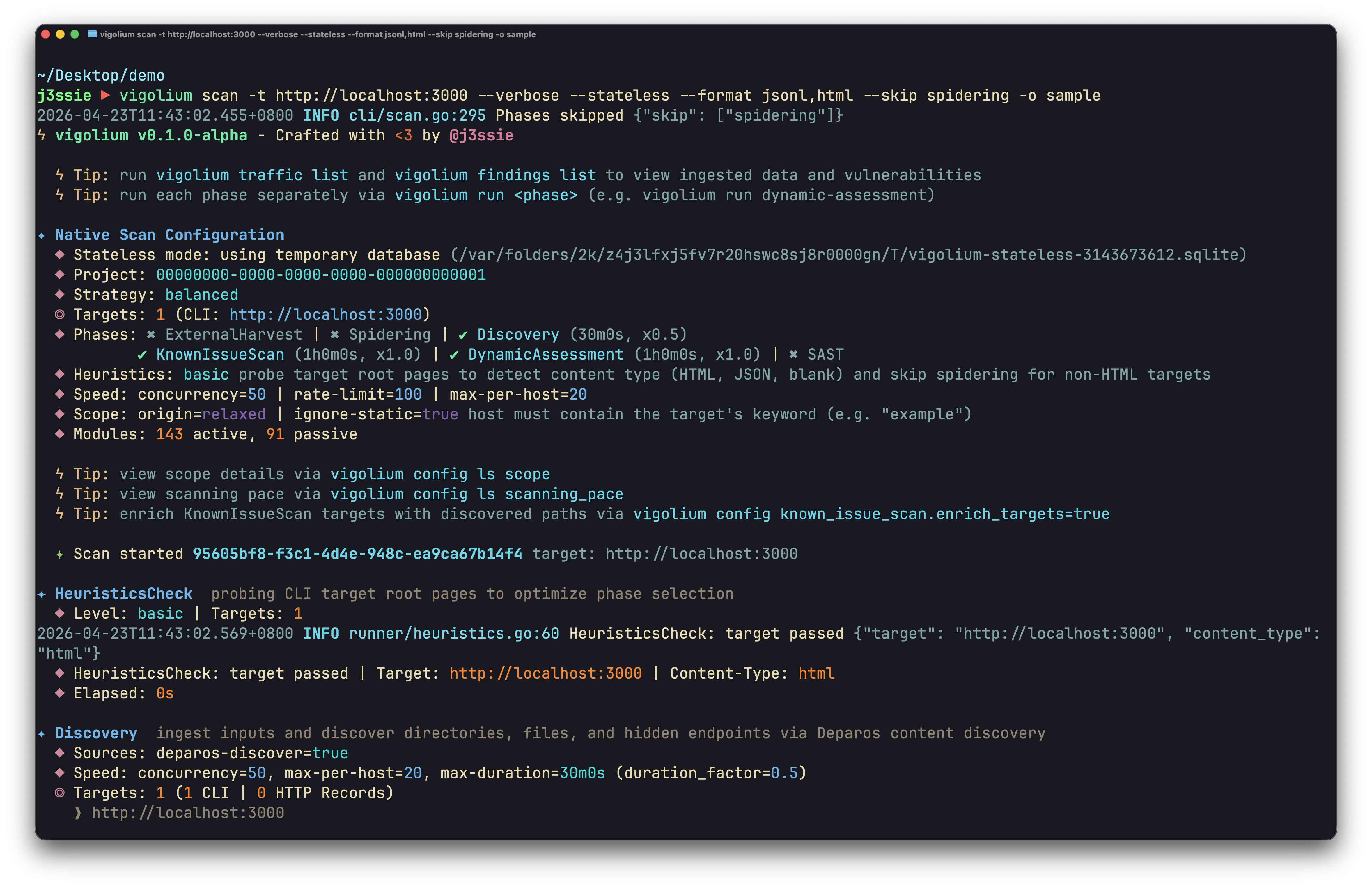
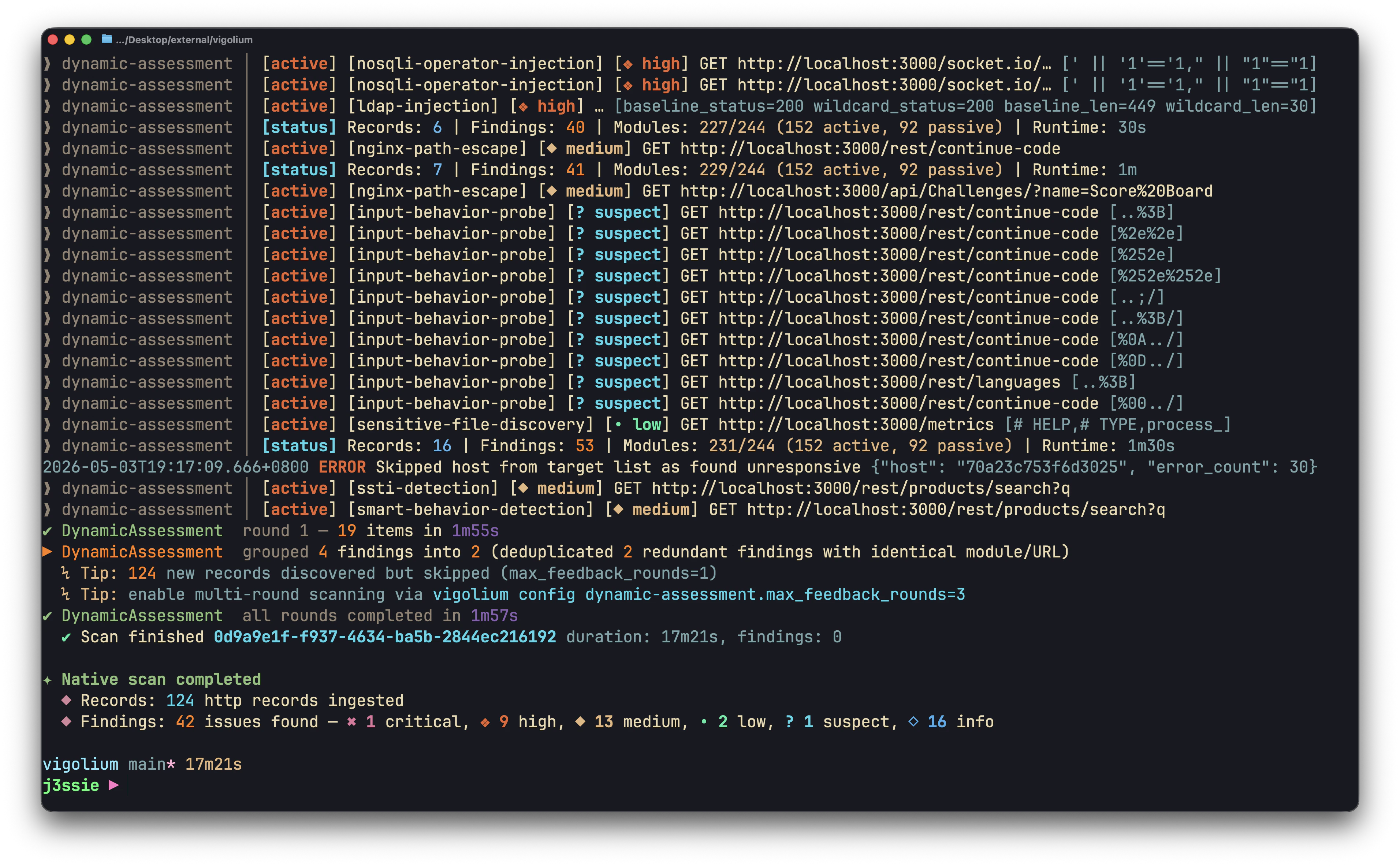 Use stateless scanning for CI/CD pipelines, scripting, AI-agent integration, and quick ad-hoc checks. For the conceptual deep-dive see [Scanning Modes Overview](/native-scan/scanning-modes-overview); for the full strategy reference see [Strategies](/native-scan/strategies).
## Stateless at a glance
| Command | Persists to DB? | Phases | Use it for |
| ------------------ | ----------------------------- | ----------------------- | ------------------------- |
| `scan-url` | No | none, direct module run | One URL, fast |
| `scan-request` | No | none, direct module run | A raw HTTP request / curl |
| `scan --stateless` | No (temp DB, discarded) | full pipeline | One-shot full scan |
| `scan` | Yes (`~/.vigolium/...sqlite`) | full pipeline | Persistent projects |
`scan-url` and `scan-request` never touch a database. `scan --stateless` creates a temporary SQLite database, runs every requested phase, exports results, and deletes the database on exit.
Pass `-o/--output` (with `--format`) when using `--stateless`, otherwise results are discarded along with the temporary database. Vigolium prints a warning if you forget. `--stateless` and `--db` are mutually exclusive.
## Scan a single URL, `scan-url`
```bash theme={null}
# Simplest possible scan
vigolium scan-url https://example.com/api/users?id=1
# JSON output for scripting
vigolium scan-url -j https://example.com/api/users?id=1
```
POST with a body and headers:
```bash theme={null}
vigolium scan-url \
--method POST \
--body '{"user":"admin","pass":"secret"}' \
-H 'Content-Type: application/json' \
-H 'Authorization: Bearer tok123' \
https://example.com/api/login
```
Scope the modules and skip work you don't need:
```bash theme={null}
# Only injection-class modules (fuzzy match on ID/name)
vigolium scan-url -m sqli -m xss "https://example.com/search?q=test"
# Filter by tag
vigolium scan-url --module-tag injection https://example.com/api/data
# Skip passive analysis and insertion-point fuzzing for the fastest result
vigolium scan-url --no-passive --no-insertion-points https://example.com/api/data
```
Run a discovery/spider phase *before* the scan (these promote `scan-url` to the full pipeline and require a database, pass `--db`):
```bash theme={null}
vigolium scan-url --discover --db /tmp/scan.sqlite https://example.com
```
## Scan a raw HTTP request, `scan-request`
```bash theme={null}
# From a file containing a raw HTTP request
vigolium scan-request -i request.txt
# From stdin
printf 'GET /api/users?id=1 HTTP/1.1\r\nHost: example.com\r\n\r\n' \
| vigolium scan-request
# From a curl command (auto-detected)
echo "curl -X POST -d 'user=admin' https://example.com/login" \
| vigolium scan-request
```
Override the host when the request file has only a path:
```bash theme={null}
vigolium scan-request -i request.txt --target https://staging.example.com
```
## Piping from stdin
Both `scan-url` and `scan-request` auto-detect the stdin format, plain URL, curl command, or raw HTTP request:
```bash theme={null}
# Plain URL
echo 'https://example.com/search?q=test' | vigolium scan-url
# Curl command
echo "curl -H 'Content-Type: application/json' -d '{\"id\":1}' https://example.com/api" \
| vigolium scan-url
# Raw HTTP request
printf 'POST /api/login HTTP/1.1\r\nHost: example.com\r\nContent-Type: application/x-www-form-urlencoded\r\n\r\nuser=admin&pass=secret' \
| vigolium scan-request
# Scan whatever is on your clipboard (macOS)
pbpaste | vigolium scan-url -j
```
## Full stateless pipeline, `scan --stateless`
Run discovery, spidering, and dynamic-assessment with no persistent state. `--stateless` works on both `scan` and `run`:
```bash theme={null}
# Full pipeline, JSONL out, nothing left behind
vigolium scan --stateless -t https://example.com --format jsonl -o results
# Add content discovery, write both JSONL and HTML
vigolium scan --stateless -t https://example.com \
--discover --format jsonl,html -o scan-output
# A single phase, statelessly
vigolium run dynamic-assessment --stateless -t https://example.com \
--format jsonl -o results
```
Multiple targets from a file scan into one shared temporary database and export to a single unified output file by default:
```bash theme={null}
vigolium scan --stateless -T targets.txt --format jsonl -o results
# -> results.jsonl (all targets combined)
```
Add `--split-by-host` to instead scan each target in its own isolated temporary database and write a separate per-host output file (the filename is suffixed with the host so results don't overwrite):
```bash theme={null}
vigolium scan --stateless -T targets.txt --split-by-host --format jsonl -o results
# -> results-example.com.jsonl, results-test.example.com.jsonl, ...
```
## ⚡Scanning a huge list of targets in parallel
When you point Vigolium at a large target list, use `-P/--parallel N` to scan several hosts at once. Each target runs in its own isolated child process — so there is no cross-contamination between workers — and each child keeps its own `--concurrency`, meaning real in-flight requests are roughly `N × --concurrency`.
`-P` requires one of two output strategies so results never collide:
* **`--stateless --split-by-host`** — each target runs against its own temporary database and writes a separate per-host output file (`base-.`). Nothing is persisted. Best for stateless, fire-and-forget batches.
* **`--db-isolate`** — each worker scans into a private temporary SQLite database, then merges its results into the shared `--db` (or the default DB) at the end. This lets many parallel scans share one database without write contention, and you export one unified report from the merged DB afterward.
```bash theme={null}
# Stateless fan-out: per-host JSONL + HTML files, 3 targets at a time
vigolium scan -T list-of-targets.txt -P 3 \
--stateless --split-by-host \
--format jsonl,html --output prefix-output \
--fuzz-wordlist ~/Tools/contents/fast.txt
# Shared-DB fan-out: 4 targets at a time merged into one local.db, one unified output
vigolium scan -T list-of-targets.txt -P 4 \
--db-isolate --db local.db \
--format jsonl,html --output report \
--fuzz-wordlist ~/Tools/contents/fast.txt
```
`--db-isolate` is SQLite-only and cannot be combined with `--stateless` (they are two different ways to avoid write contention). Pressing `Ctrl-C` during a `-P` batch is treated as an operator stop: un-started and cut-short targets are reported as "not scanned" rather than failures.
### Resuming an interrupted fan-out
A stateless parallel fan-out (`-S -T --split-by-host -P`) writes a tiny line-cursor manifest, `
Use stateless scanning for CI/CD pipelines, scripting, AI-agent integration, and quick ad-hoc checks. For the conceptual deep-dive see [Scanning Modes Overview](/native-scan/scanning-modes-overview); for the full strategy reference see [Strategies](/native-scan/strategies).
## Stateless at a glance
| Command | Persists to DB? | Phases | Use it for |
| ------------------ | ----------------------------- | ----------------------- | ------------------------- |
| `scan-url` | No | none, direct module run | One URL, fast |
| `scan-request` | No | none, direct module run | A raw HTTP request / curl |
| `scan --stateless` | No (temp DB, discarded) | full pipeline | One-shot full scan |
| `scan` | Yes (`~/.vigolium/...sqlite`) | full pipeline | Persistent projects |
`scan-url` and `scan-request` never touch a database. `scan --stateless` creates a temporary SQLite database, runs every requested phase, exports results, and deletes the database on exit.
Pass `-o/--output` (with `--format`) when using `--stateless`, otherwise results are discarded along with the temporary database. Vigolium prints a warning if you forget. `--stateless` and `--db` are mutually exclusive.
## Scan a single URL, `scan-url`
```bash theme={null}
# Simplest possible scan
vigolium scan-url https://example.com/api/users?id=1
# JSON output for scripting
vigolium scan-url -j https://example.com/api/users?id=1
```
POST with a body and headers:
```bash theme={null}
vigolium scan-url \
--method POST \
--body '{"user":"admin","pass":"secret"}' \
-H 'Content-Type: application/json' \
-H 'Authorization: Bearer tok123' \
https://example.com/api/login
```
Scope the modules and skip work you don't need:
```bash theme={null}
# Only injection-class modules (fuzzy match on ID/name)
vigolium scan-url -m sqli -m xss "https://example.com/search?q=test"
# Filter by tag
vigolium scan-url --module-tag injection https://example.com/api/data
# Skip passive analysis and insertion-point fuzzing for the fastest result
vigolium scan-url --no-passive --no-insertion-points https://example.com/api/data
```
Run a discovery/spider phase *before* the scan (these promote `scan-url` to the full pipeline and require a database, pass `--db`):
```bash theme={null}
vigolium scan-url --discover --db /tmp/scan.sqlite https://example.com
```
## Scan a raw HTTP request, `scan-request`
```bash theme={null}
# From a file containing a raw HTTP request
vigolium scan-request -i request.txt
# From stdin
printf 'GET /api/users?id=1 HTTP/1.1\r\nHost: example.com\r\n\r\n' \
| vigolium scan-request
# From a curl command (auto-detected)
echo "curl -X POST -d 'user=admin' https://example.com/login" \
| vigolium scan-request
```
Override the host when the request file has only a path:
```bash theme={null}
vigolium scan-request -i request.txt --target https://staging.example.com
```
## Piping from stdin
Both `scan-url` and `scan-request` auto-detect the stdin format, plain URL, curl command, or raw HTTP request:
```bash theme={null}
# Plain URL
echo 'https://example.com/search?q=test' | vigolium scan-url
# Curl command
echo "curl -H 'Content-Type: application/json' -d '{\"id\":1}' https://example.com/api" \
| vigolium scan-url
# Raw HTTP request
printf 'POST /api/login HTTP/1.1\r\nHost: example.com\r\nContent-Type: application/x-www-form-urlencoded\r\n\r\nuser=admin&pass=secret' \
| vigolium scan-request
# Scan whatever is on your clipboard (macOS)
pbpaste | vigolium scan-url -j
```
## Full stateless pipeline, `scan --stateless`
Run discovery, spidering, and dynamic-assessment with no persistent state. `--stateless` works on both `scan` and `run`:
```bash theme={null}
# Full pipeline, JSONL out, nothing left behind
vigolium scan --stateless -t https://example.com --format jsonl -o results
# Add content discovery, write both JSONL and HTML
vigolium scan --stateless -t https://example.com \
--discover --format jsonl,html -o scan-output
# A single phase, statelessly
vigolium run dynamic-assessment --stateless -t https://example.com \
--format jsonl -o results
```
Multiple targets from a file scan into one shared temporary database and export to a single unified output file by default:
```bash theme={null}
vigolium scan --stateless -T targets.txt --format jsonl -o results
# -> results.jsonl (all targets combined)
```
Add `--split-by-host` to instead scan each target in its own isolated temporary database and write a separate per-host output file (the filename is suffixed with the host so results don't overwrite):
```bash theme={null}
vigolium scan --stateless -T targets.txt --split-by-host --format jsonl -o results
# -> results-example.com.jsonl, results-test.example.com.jsonl, ...
```
## ⚡Scanning a huge list of targets in parallel
When you point Vigolium at a large target list, use `-P/--parallel N` to scan several hosts at once. Each target runs in its own isolated child process — so there is no cross-contamination between workers — and each child keeps its own `--concurrency`, meaning real in-flight requests are roughly `N × --concurrency`.
`-P` requires one of two output strategies so results never collide:
* **`--stateless --split-by-host`** — each target runs against its own temporary database and writes a separate per-host output file (`base-.`). Nothing is persisted. Best for stateless, fire-and-forget batches.
* **`--db-isolate`** — each worker scans into a private temporary SQLite database, then merges its results into the shared `--db` (or the default DB) at the end. This lets many parallel scans share one database without write contention, and you export one unified report from the merged DB afterward.
```bash theme={null}
# Stateless fan-out: per-host JSONL + HTML files, 3 targets at a time
vigolium scan -T list-of-targets.txt -P 3 \
--stateless --split-by-host \
--format jsonl,html --output prefix-output \
--fuzz-wordlist ~/Tools/contents/fast.txt
# Shared-DB fan-out: 4 targets at a time merged into one local.db, one unified output
vigolium scan -T list-of-targets.txt -P 4 \
--db-isolate --db local.db \
--format jsonl,html --output report \
--fuzz-wordlist ~/Tools/contents/fast.txt
```
`--db-isolate` is SQLite-only and cannot be combined with `--stateless` (they are two different ways to avoid write contention). Pressing `Ctrl-C` during a `-P` batch is treated as an operator stop: un-started and cut-short targets are reported as "not scanned" rather than failures.
### Resuming an interrupted fan-out
A stateless parallel fan-out (`-S -T --split-by-host -P`) writes a tiny line-cursor manifest, `